
Searching by Instrumentation in RISM
For musicians, one of the most helpful features of the RISM database is the ability to search by instrumentation. (Here and throughout, we include voice types when talking about instruments.) This page will explain how to search for music with your instrument(s) in the RISM Catalog and RISM Online.
RISM Instrument Abbreviations
A key to searching by instrument is using RISM’s terminology. RISM has its own set of abbreviations and standardized terms when refering to instruments in the database. Sometimes we use actual abbreviations, such as vl for violin or ob for oboe. In other cases, we use Italian terms, such as saxofono for saxophone. General terms, such as strings or winds, are in English. Regional instruments are written in the original language, such as chirimía for a type of Spanish double reed instrument.
The list of RISM instrument abbreviations is available through the RISM Cataloging Guidelines website and on the help page of the RISM Catalog.
The list of RISM instrument abbreviations is sorted by instrument family and then from highest to lowest range or alphabetically.
In the RISM database, you will find instruments listed in a piece’s full scoring as well as in a scoring summary. Keep in mind that the musical source itself strongly determines what instrument is listed, so if the source is unclear, a general abbreviation might be used in the record rather than a specific one: V (any voice) instead of S (Soprano) or T (Tenor), or keyb (any keyboard instrument) rather than pf (piano) or hpcd (harpchord), for example.
The scoring summaries help give an overview of the instrumentation of a piece.
Some examples of scoring summaries:
- orch: a piece for orchestra or ensemble
- strings: strings only, or string orchestra
- winds: wind instruments (brass and woodwind)
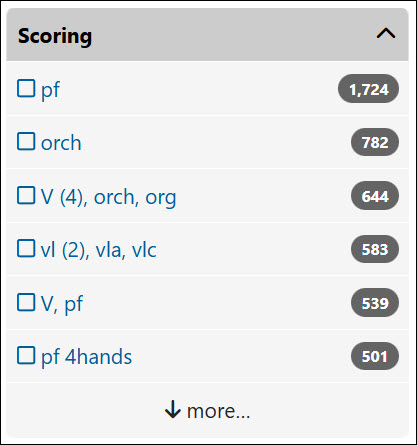
- V (4), orch, org: four vocal soloists, orchestra, and organ
- V (2): vocal duet
- S (2), pf: duet for two sopranos and piano
- vl (2), vla, vlc: string quartet
- vl (2), vla (2), vlc: string quintet (2 violas)
- vl (2), vla, vlc (2): string quintet (2 cellos)
- vl (2), vla, vlc, cb: string quintet (with double bass)
- vl, vlc, pf: piano trio
- fl (4): flute quartet (all flutes)
- fl, vl, vla, vlc: flute quartet (flute with strings)
- vl, orch: violin concerto
- cl, orch: clarinet concerto
Searching by Instrumentation in the RISM Catalog
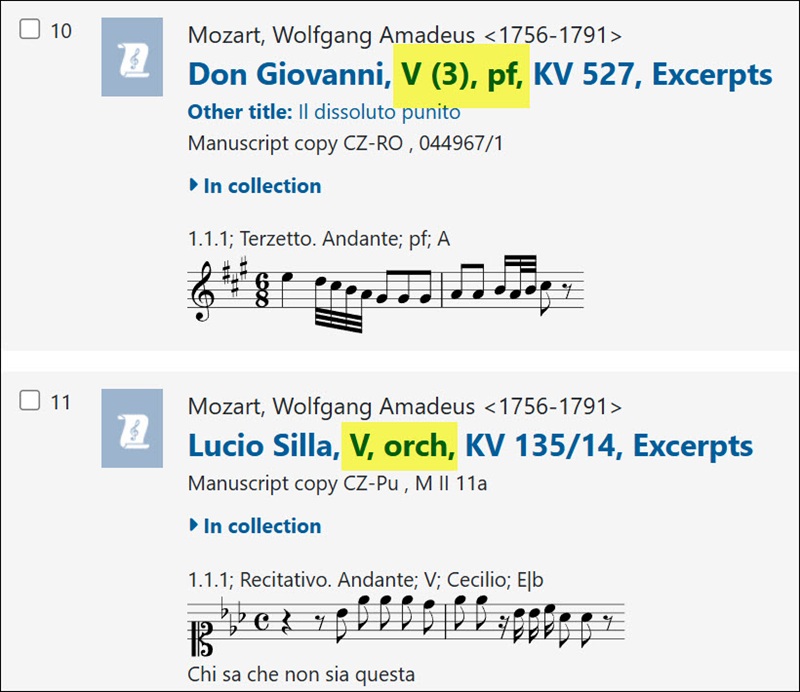
In the RISM Catalog, the scoring summaries are shown on the page of search results next to the piece’s title.
You will also see RISM’s scoring summaries on the page of search results. On the left-hand side, the filter Scoring displays the summaries.
In the full record view, the scoring summary is at the top of the record under Work information.

View the full record: RISM ID no. 1001196649.
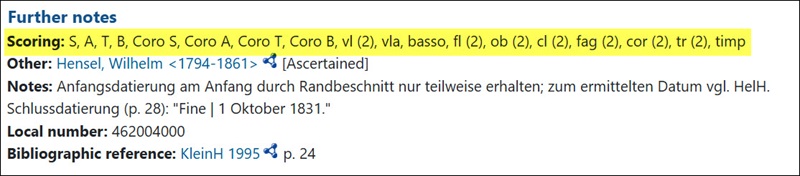
The specific instruments–in this case, the exact voices, the makeup of the choir, and the instruments in the orchestra–are listed under Scoring in the Further notes section.
When you do an Advanced Search and select the field Scoring, a small “i” appears to the right. When you click on it, a pop-up window opens with the abbreviations in one column, arranged by instrument family, and the English term in the other column. Use only the instrument abbreviations in your search (omit numbers). The field Scoring searches the scoring summaries.
You can also do a basic search (all fields) to search by instrumentation, but this is generally efficient if you have a more unusual instrument, such as bombarde. This instrument is not likely to appear in the scoring summary (just a couple results in the scoring search), but it is indexed in the full instrumentation (over 150 results in the basic search).
Searching by Instrumentation in RISM Online
In RISM Online, instrumentation appears in the Title and content description area, first as the Scoring summary and then Total scoring:
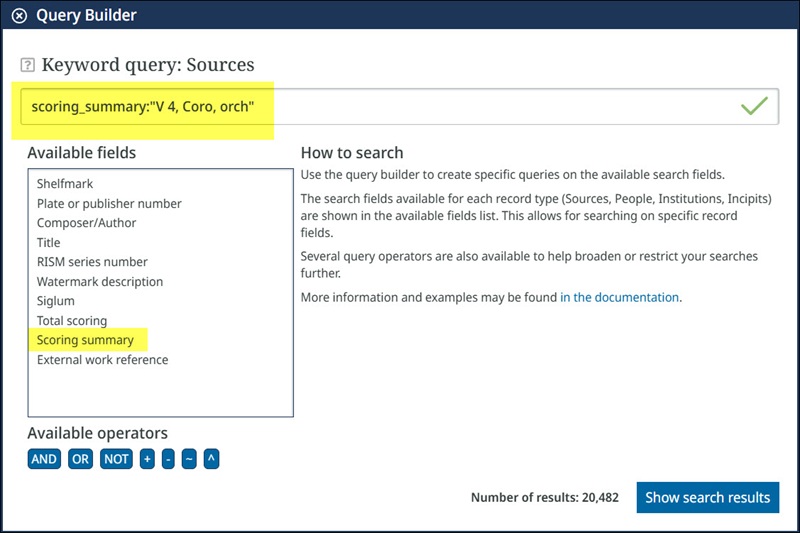
You can search either of these two fields, Scoring summary and Total scoring, through the Query Builder at the top of the page.
Click Create a query just below the main search box.

Select Scoring summary to enter multiple instruments in summarized form. Use quotation marks if your query contains a space or hyphen. Omit any parenthesis.
Examples:
- 4 voices, chorus, and orchestra: scoring_summary:”V 4, Coro, orch”
- Orchestra: scoring_summary:orch
- String quartet: scoring_summary:”vl 2, vla, vlc”
To search single instruments, select Total scoring and enter one instrument. Use quotation marks if your query contains a space or hyphen.

Examples:
- Saxophone: scoring:saxofono
- Tenor saxophone: scoring:”t-saxofono”
- Violin: scoring:vl
- English horn: scoring:”cor inglese”
- Mezzo-Soprano: scoring:”Mezzo-S”
- Bombarde: scoring:bombarde
Instruments can be searched in combination with other fields to further refine your search, either through using additional fields in the query builder or selecting elements from the main search interface. Some examples are: